
Ecobee: Shell Access via Serial Debug Port
A hardware hacking walkthrough on obtaining root shell access to the ecobee smart thermostat through its UART debug interface.
Ecobee: Shell Access via Serial Debug Port
Smart thermostats have become ubiquitous in modern homes, controlling HVAC systems and collecting environmental data around the clock. The ecobee is a popular choice, but like many IoT devices, it contains debug interfaces that were never intended for end user access. This article explores how security researchers can obtain shell access through the device's serial debug port a common technique in embedded systems security research.
The Debug Interface Problem
Many embedded devices ship with debug interfaces still active on their production hardware. These interfaces typically UART (Universal Asynchronous Receiver/Transmitter), JTAG, or SWD are invaluable during development but present security risks when left accessible in consumer products.
The ecobee contains a UART interface on its application board that provides access to an interactive shell. While the interface is somewhat obscured on the PCB, it's not disabled, allowing anyone with physical access and basic hardware tools to interact with the underlying operating system.
Finding the UART Interface
The UART interface on the ecobee is located on pad P4, though it's intentionally obscured there are no clearly labeled test points or pin headers.
Making the Hardware Connection
The ecobee operates at 3.3V logic levels, the physical connection requires a USB-to-serial adapter. The wiring follows the standard UART convention with one critical detail TX and RX are crossed over. The device's transmit (TX) connects to the adapter's receive (RX), and vice versa. Ground (GND) connects directly between both sides.
| Ecobee PCB (P4) | USB-Serial Adapter |
|---|---|
| GND | GND |
| TX | RX |
| RX | TX |
Below is an image of it: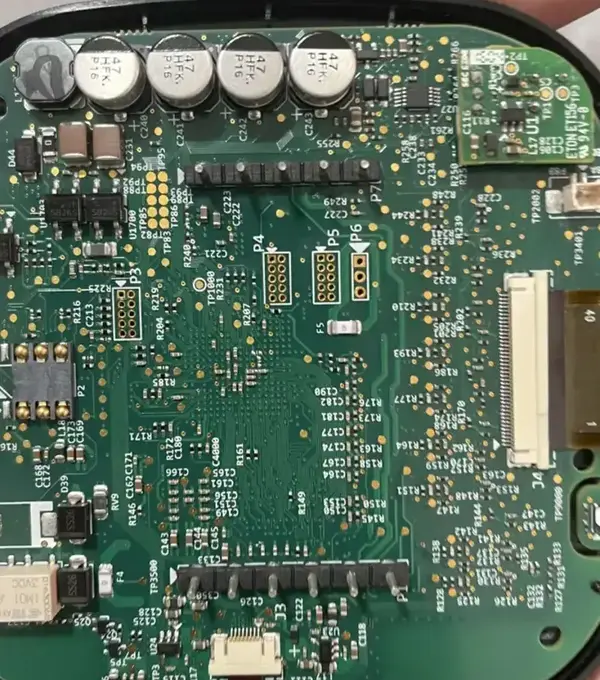
Configuring the Serial Connection
Use 115200 baud
Terminal emulators like minicom, screen, or picocom can establish the connection:
# Using screen
screen /dev/ttyUSB0 115200
The standard configuration for the ecobee is 115200 8N1 115200 baud, 8 data bits, no parity, 1 stop bit.
What the Boot Process Reveals
With the serial connection established, power cycling the device reveals something immediately interesting the entire boot process streams across the terminal. First comes the bootloader (U-Boot in this case), announcing itself and the hardware it's running on:
U-Boot 2016.03 (ecobee build)

CPU:   Freescale i.MX28 family
DRAM:  256 MiB
MMC:   FSL_SDHC: 0, FSL_SDHC: 1
...
Hit any key to stop autoboot:  3
The Autoboot Window
Hit any key to stop autoboot. During this brief window, pressing any key interrupts the automatic boot sequence and drops into the U-Boot command prompt (indicated by =>). From this bootloader shell, it's possible to examine environment variables with printenv, view boot arguments, or manually control the boot process. This level of access exists purely for debugging during development but remains active in production devices.
Received 16 B message F1 with bad CRC: calc = 0x19AF received = 0x3C12
Received RTC time = 1609459200
Get DATE: 2021-01-01 (wday=5)  TIME: 00:00:00
RTC Time = 01-01-2021 00:00:00

top guard: B001C840
00: 5ee41a90
01: 5ee41b20
02: 0
03: 0
04: 0
05: 0
06: 0
07: 0
08: 0
09: 0

bot guard: b001c840
Final Boot Mode = 2
uboot flash version=0x1051   usegolden=1
Updating bootinfo

Note: Using recovery kernel and root.
bootcmd="run bootargs_recovery; watchdog; nand read ${loadaddr} 00200000 600000; bootm ${loadaddr}"
The Login Prompt and Credential Discovery
After the Linux kernel completes its boot sequence, the system presents a login prompt:
/config # id
uid=0(root) gid=0(root)

/config # ls -la
drwxr-xr-x  15 root root  4096 Aug 21  2021 .
drwxrwxr-x  19 514  514   1408 Mar 12  2021 ..
-rw-r--r--   1 root root  7421 Aug 21  2021 alert_rules.xml
lrwxrwxrwx   1 root root    27 Mar 10  2021 backplate.hex -> /idt/backplate-2.1.004.hex
drwxr-xr-x   2 root root   192 Jan  1  1970 bootImage
-rw-r--r--   1 root root   161 Mar 11  2021 compressorMinTemp.json
-rw-r--r--   1 root root   161 Mar 11  2021 compressorMinTemp_backup.json
drwxr-xr-x   2 root root   160 Jan  1  1970 contractorImage
-rw-r--r--   1 root root   128 Aug 21  2021 curl_debug.log
drwxrwxrwx   2 root root   160 Apr 22  2020 defaults
-rw-r--r--   1 root root   244 Mar 10  2021 dev_manager.json
-rw-r--r--   1 root root   244 Mar 10  2021 dev_manager_alt.json
drwxr-xr-x   2 root root   256 Mar 12  2021 developer
-rwxr-xr-x   1 root root     0 Jun  2  2015 legacysslport.tag
drwxr-xr-x   2 root root   160 Jan  1  1970 eipImage
-rw-r--r--   1 root root     0 Aug 21  2021 experimentRunner.log
-rw-r--r--   1 root root   312 Mar 13  2021 feelslike.json
-rw-r--r--   1 root root   312 Mar 13  2021 feelslike_night.json
-rw-r--r--   1 root root    64 Mar  1  2021 firstBoot.log
drwxrwxrwx   2 root root   160 Apr 22  2020 golden
-rw-r--r--   1 root root   158 Mar 10  2021 homekit.json
-rw-r--r--   1 root root   158 Mar 10  2021 homekit_dev.json
-rw-r--r--   1 root root   144 Aug 21  2021 hvacRuntimeData.xml
drwxr-xr-x   2 root root   160 Mar 11  2021 idtImage
lrwxrwxrwx   1 root root    21 Mar 10  2021 idtm -> /idt/idtm-4.6.01.12
lrwxrwxrwx   1 root root    26 Mar 10  2021 images.mmz -> /idt/images-4.6.01.2.mmz
drwxr-xr-x   2 root root   704 Mar 12  2021 keys
-rw-r--r--   1 root root   312 Mar 13  2021 lastOnTimes
lrwxrwxrwx   1 root root    27 Mar 10  2021 libcore.so -> /idt/libcore-4.6.01.88.so
lrwxrwxrwx   1 root root    28 Mar 10  2021 libfonts.so -> /idt/libfonts-4.6.01.44.so
lrwxrwxrwx   1 root root    30 Mar 10  2021 libhomekit.so -> /idt/libhomekit-4.6.01.88.so
lrwxrwxrwx   1 root root    32 Mar 10  2021 libwacserver.so -> /idt/libwacserver-4.6.01.88.so
lrwxrwxrwx   1 root root    27 Mar 10  2021 libwifi.so -> /idt/libwifi-4.6.01.88.so
lrwxrwxrwx   1 root root    34 Mar 10  2021 libwifi.so.old -> /idt/libwifi-4.5.57.41.so
-rw-r--r--   1 root root    96 Mar 13  2021 outdoorMinTempDB.xml
drwxr-xr-x   2 root root   320 Mar 12  2021 patch
-rw-------   1 root root    48 Mar 10  2021 secret.key
-rw-r--r--   1 root root   164 Aug 21  2021 stacktrace
-rw-r--r--   1 root root 31210 Aug 21  2021 stacktrace_history
-rw-r--r--   1 root root 28112 Mar 11  2021 thermostat_main.xml
-rw-r--r--   1 root root 28112 Mar 12  2021 thermostat_main.xml.sync
drwxr-xr-x   2 root root   512 Mar 11  2021 tools
drwxr-xr-x   2 root root   160 Jan  1  1970 userImage
drwxr-xr-x   2 root root   160 Jan  1  1970 utilityImage
-rw-r--r--   1 root root   912 Mar 12  2021 wifi_config.json
-rw-r--r--   1 root root   912 Mar 12  2021 wifi_config_backup.json
Ecobee uses hard coded default root credentials that are identical across all devices. These credentials aren't documented anywhere publicly, but they can be recovered through firmware analysis.
The typical process involves extracting the firmware from the device's NAND flash memory, locating the password hash in /etc/shadow, and can be easily cracked using Hashcat, the password hash, while not stored in plaintext, lacks sufficient complexity and can be brute forced relatively quickly.
This represents a significant security vulnerability. Unlike a web service where credentials can be unique per user or rotated regularly, every ecobee device in the world shares the same root password. Compromising one device effectively compromises the entire product line.
# Example /etc/shadow entry format
root:$6$rounds=5000$salt$hash:17000:0:99999:7:::
How Firmware Gets Extracted
Physical extraction involves using a flash programmer to read the NAND chip directlyremoving the chip from the board or using in circuit programming. Runtime extraction is simpler if shell access is already gained just copy the filesystem while the device runs.
The Device's Software Stack
The ecobee runs a custom Linux based firmware on the i.MX6 ARM processor, its not rtos. The software stack includes web services for cloud connectivity, local APIs for the mobile app to communicate with, sensor polling services that constantly monitor temperature, humidity, and occupancy, and WiFi management for network connectivity.
Security Implications
This research highlights several concerning security practices:
Hard-coded Credentials
Using the same root password across all devices means compromising one device effectively compromises all devices. An attacker with physical access to any single unit can extract credentials applicable to the entire product line.
Active Debug Interfaces
Debug interfaces should be disabled or removed in production hardware. At minimum, they should require authentication before providing access.
Unencrypted Storage
Related research has shown the ecobee stores sensitive data (WiFi credentials, API tokens) in unencrypted form on the filesystem.
Lack of Secure Boot
Without secure boot verification, an attacker with shell access can modify the firmware to add backdoors, exfiltrate data, or pivot to other network devices.
Mitigation Recommendations
For manufacturers:
- Disable debug interfaces in production firmware
- Use unique per-device credentials generated during manufacturing
- Implement secure boot to prevent unauthorized firmware modification
- Encrypt sensitive data at rest
- Implement hardware fuses to permanently disable debug access
For consumers:
- Network segmentation: Place IoT devices on a separate VLAN
- Monitor traffic: Watch for unusual outbound connections
- Physical security: Limit physical access to installed devices
- Regular updates: Keep firmware current